

Most accountants know they should be posting more. Clients search for advice online, referrers check LinkedIn before they make an introduction, and a quiet Google Business Profile makes a busy practice look closed. The problem is rarely ideas. It is time. Between client deadlines, payroll runs and the January rush, marketing is the first thing to slip.
The good news is that an accountancy practice already has everything it needs for great content: deadlines that come round every year, questions clients ask every week, and changes to tax rules that people want explained in plain English. This guide shows how to turn that into a full month of posts in a single afternoon, using a repeatable process and the Neonify app.
Why content is hard for accountancy practices
Accountants face a particular set of challenges when it comes to marketing. Accuracy matters, so you cannot let anyone post half-right information about tax. Tone matters too: clients want reassurance, not jargon or hype. And the busiest months for content, the run-up to the 31 January self assessment deadline, are also the busiest months for the work itself.
That is why so many practices either post nothing for months or hand the job to a generic agency that does not really understand the work. Neither builds trust. What works is short, accurate, helpful content that sounds like the people clients actually deal with.
- Post when someone remembers, often months apart
- Generic stock posts that could be from any firm
- Partners rewrite agency drafts because the tone is wrong
- Nothing on Google Business Profile for weeks
- A planned month of posts, created in one sitting
- Drafts written in your brand voice from your own facts
- Partners post in their own voice using a Digital Twin
- Publish to LinkedIn, Facebook, Instagram and Google from one place
Fernhill & Quay Accountants is a fictional six-person practice in Brighton that looks after sole traders and small limited companies. They want to win more limited company clients, remind existing clients about deadlines and show that they are approachable. This example uses the demo brand we set up inside the real Neonify app, so the screens you see below are genuine.
76% of UK small business owners and tradespeople spend time every week creating social media content, and 54% spend one to three hours on it (Markel Direct research, August 2026). Only 19% of small business owners say they feel very confident using AI day to day (Simply Business SME Insights Report 2026).
Step 1: set up your brand voice and facts (one-off, about 30 minutes)
Before you write a single post, teach Neonify how your practice sounds and what it offers. This is the step that separates useful AI content from bland AI content.
Create your brand voice
Paste a few paragraphs you have already written, such as your website about page or a client newsletter, or simply add your website address. Neonify turns it into a brand voice guide covering your tone, key phrases and the words you avoid. For Fernhill & Quay, that meant warm, plain English, British spelling and always ending with one clear next step.
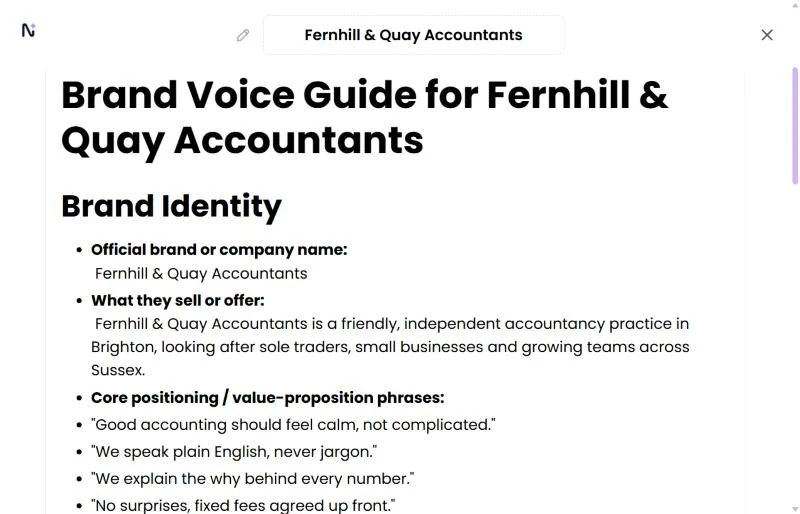
The brand voice guide Neonify generated for our demo practice from a single paragraph of copy.
Add your facts to the Knowledge Base
Next, add the facts you would tell a new member of staff: your packages and fixed fees, opening hours, the deadlines you remind clients about and the areas you cover. You can upload a document, paste text or add a link. Neonify uses this as factual context, so posts mention the right services and the right dates.
Give partners their own voice
If a partner writes the newsletter or posts on LinkedIn, create a Digital Twin from a few things they have written. Their posts will still sound like them, even when they are short on time.
Step 2: plan the month around the accountancy calendar
The easiest way to plan accountancy content is to work backwards from the dates your clients care about. Mix in three types of post so your feed does not become a wall of reminders: educational posts, behind-the-scenes posts and proof. Here is the plan Fernhill & Quay used for January.
Example: January content plan for an accountancy practice
Step 3: create the posts with Quick Post
With the plan in place, open Quick Post, choose Auto, type the topic and pick your brand voice. Neonify drafts a caption and a matching image. You review it, change anything you like and either publish now or schedule it. Because your brand voice and Knowledge Base are already set up, the drafts use your fees, your deadlines and your tone without you repeating them each time.
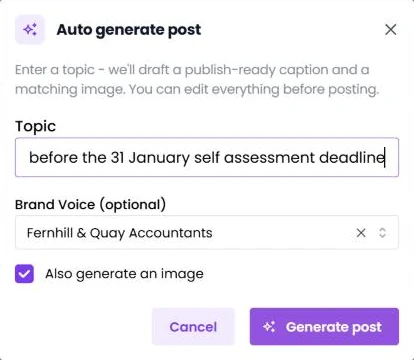
Quick Post: enter a topic, choose a brand voice and generate a draft caption and image.
Try the example below. Switch between platforms to see how one idea is adapted for LinkedIn, Instagram and Google Business Profile, then compare a generic AI draft with one written in the practice's brand voice.
Example posts for a fictional practice, written to show the difference a brand voice makes.
Step 4: connect your accounts and publish
Connect LinkedIn, Facebook, Instagram, WordPress and Google Business Profile once. Sign-in opens in a pop-up, so you never leave Neonify. From then on, publishing is one click, and you can see what has gone out and what is scheduled from the dashboard.
The monthly routine at a glance
Twenty content ideas for accountants
- Countdown posts for self assessment, payments on account and VAT quarters
- "What counts as an allowable expense?" for sole traders and landlords
- Making Tax Digital explained in one minute
- Sole trader or limited company: the questions to ask before switching
- How to pay yourself from a limited company
- Five records every small business should keep
- Your year-end checklist
- Meet the team, one person at a time
- What happens after you send us your paperwork
- Client reviews and thank-you posts (with permission)
- Local business spotlights for clients you support
- Myth-busting posts about common tax misunderstandings
- Seasonal reminders for the end of the tax year
- Your fixed-fee packages, explained
- How to read your own profit and loss report
- Payroll and auto-enrolment reminders for employers
- Cash-flow tips for quiet months
- What to do if you receive a letter from HMRC
- Community and charity work your practice supports
- Office news, awards and new hires
Tips to keep accounting content accurate and compliant
Keep the facts in your Knowledge Base up to date, especially rates, thresholds and dates, and review every post before it goes out. Avoid giving personal tax advice in public posts: explain the general rule and invite people to get in touch about their own situation. Only share client reviews and names with permission. Finally, keep a light, human tone. Clients choose accountants they trust, and trust comes from sounding like real people who know their stuff.
The aim is not to become a content factory. It is to show up consistently with useful, accurate posts that make it easy for the right clients to pick up the phone. With a brand voice, a Knowledge Base and a simple monthly routine, an afternoon a month is enough.
Frequently asked questions
How often should an accountancy practice post on social media?
Three times a week is a sustainable rhythm for most small practices: one educational post, one reminder or deadline post and one piece of proof, such as a review or a team update. Consistency matters more than volume.
Is it safe to use AI for accounting content?
Yes, provided the facts come from you. Neonify writes from your Knowledge Base, so add your services, fees and the deadlines you want to mention, then review every draft before it is published. Nothing goes out until you approve it.
Which platforms matter most for accountants?
LinkedIn for business owners and referrers, Google Business Profile for people searching for a local accountant, and Facebook or Instagram if you serve sole traders and consumers. Neonify can publish to all of them from one place.
Can partners post in their own voice?
Yes. A Digital Twin learns how a named person writes from their emails, newsletters or articles, so partner letters and LinkedIn posts still sound like them.