

Small architecture practices win work on reputation. Clients choose an architect whose thinking they trust, often after seeing their projects on Instagram, reading a principal’s post on LinkedIn or checking reviews on Google. Yet most practices post in bursts: a flurry when a project completes, then silence for months while everyone is buried in drawings, planning applications and site visits.
The irony is that architects create interesting content every single day. Every brief has a story, every constraint has a clever response, and every planning application teaches something. This guide shows how a small practice can turn that everyday work into a steady flow of credible content, using Neonify to do the writing in the practice’s own voice.
Why content is hard for architects
Three things get in the way. The first is time: fee-earning work always comes first, and writing a thoughtful post can take an hour. The second is the long project cycle. A house may take two years from sketch to completion, so waiting for finished photography means posting very rarely. The third is tone. Architecture has its own language, and posts that drift into jargon lose the homeowners and developers you actually want to reach.
The answer is to share the process, not just the result, and to explain it in plain English. Sketches, models, planning decisions, material choices and lessons learned are all worth posting, and they keep your feed active throughout a project.
- Posts only when a project is photographed
- Long gaps while the team is busy
- Jargon that loses homeowners
- Principal’s ideas never make it online
- Process posts throughout each project
- A month of posts planned in one sitting
- Plain-English explanations in your house style
- Principal’s voice captured with a Digital Twin
Hollis Lane Architects is a fictional four-person practice in Sussex specialising in low-energy homes and extensions. They want more self-build enquiries, more referrals from builders and planners, and a profile for their principal as a voice on sustainable design.
Marketing is one of the most common uses, named by 71% of businesses using or planning to use AI (DSIT AI Adoption Survey 2026). Limited skills, expertise or knowledge held back 67% of businesses already using AI and 78% of those planning to (DSIT AI Adoption Survey 2026).
Step 1: capture your practice’s voice
Paste your design statement, a project description you are proud of or a talk transcript into Neonify, or add your website. The brand voice it creates becomes the starting point for every post. For Hollis Lane, that meant confident but approachable, explaining the why behind decisions, and avoiding words like "stunning" and "iconic".
Then give the principal a Digital Twin. Add a few things they have written, such as a blog post, a lecture or a long email to a client explaining a design. Thought-leadership posts drafted with the Twin sound like that person, which matters when clients are buying into a specific architect’s thinking.
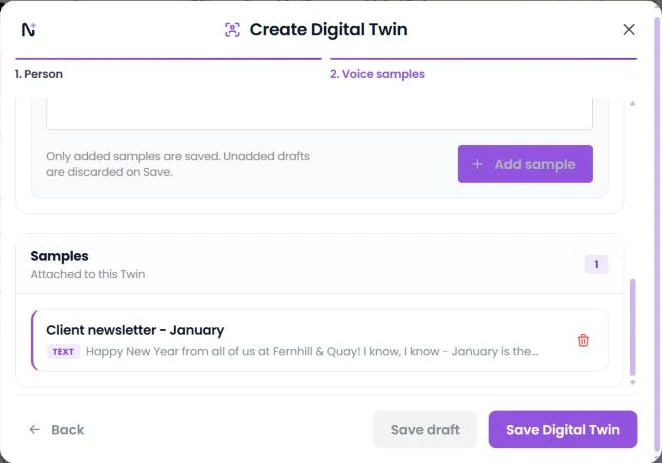
A Digital Twin is built from things a person has actually written.
Add your facts
Use the Knowledge Base for your services, the areas you work in, your process from feasibility to completion, typical timelines and anything clients regularly ask about. Neonify uses it as factual context, so posts describe your process accurately.
Step 2: plan a month of process-led content
Instead of waiting for completions, plan around the stages of live projects plus a regular thought-leadership slot. Here is a month for Hollis Lane.
Example: a month of content for a small architecture practice
Step 3: generate the posts in your voice
For each topic, open Quick Post, choose Auto, enter the topic and choose your brand voice. Add a little context in the topic itself, such as the constraint or the design response, and Neonify drafts a caption and image. Swap in your own sketches, renders or photos, check the wording and publish or schedule.
The example shows one project milestone adapted for three platforms. Toggle the voice to compare a generic AI post with one grounded in the practice’s voice and facts.
Example posts for a fictional practice, written to show the difference a brand voice makes.
Step 4: publish where your clients look
For most practices that means LinkedIn for developers, builders and other professionals; Instagram for homeowners looking for inspiration; your WordPress website for longer project write-ups; and Google Business Profile for local searches. Connect them once and publish from Neonify.
From live project to published post
Content ideas for architects
- The brief, the constraint and the design response for a live project
- Sketch-to-render or model-to-site sequences
- Planning wins and what made the application succeed
- Permitted development versus full planning, explained simply
- Pre-application advice: when it helps and what it costs in time
- Material choices and why you made them
- Low-energy design principles in plain English
- Budget myths: where money really goes in a self-build
- Client reviews and completion stories (with permission)
- Collaborations with builders, engineers and landscape designers
- Team profiles and studio culture
- Talks, awards and publications
How to tell if it is working
Architecture is a long sales cycle, so do not judge content by likes alone. Track the things that lead to commissions: enquiries that mention a post or your Instagram, new contacts from builders and estate agents, feasibility calls booked and visits to your project pages. Ask every new enquiry how they found you, and note the answer. After three months you will see which kinds of post start conversations. For most small practices it is the plain-English explainers and the process stories, not the polished renders. Double down on those, and use Neonify’s scheduling to keep at least two posts a week going out even when a big deadline lands. Consistency is what turns occasional visibility into a reputation, and a reputation is what brings the right clients to you.
Tips for architects
Lead with the problem, not the picture. A post that explains why a window is where it is will out-perform another beautiful render. Keep the language plain: if a homeowner would not use the word, explain it or drop it. Always check client permissions and keep addresses private. Use the principal’s Digital Twin for opinion and insight, and the practice brand voice for project news, so both voices stay consistent.
Above all, share the process. Clients hire architects because they trust how they think. Regular, well-explained posts about real projects are the most convincing portfolio you can have, and with Neonify they take an afternoon a month rather than an hour a post.
Frequently asked questions
What should architects post on LinkedIn?
Project stories that explain the brief, the constraint and the design response; planning and sustainability insights; behind-the-scenes process shots; and team news. LinkedIn rewards posts that teach something rather than simply announce something.
Can I show client projects before they are finished?
Only with the client’s permission. Many practices share sketches, models and process images during design, then completed photography later. Keep addresses and personal details private.
How does a Digital Twin help a practice?
Principals often have a distinctive way of explaining design. A Digital Twin learns that voice from their articles, talks or emails, so thought-leadership posts still sound like them even when someone else prepares the draft.
Is AI content good enough for a design-led brand?
Generic AI content is not. Content grounded in your brand voice and Knowledge Base, then reviewed by you, is a different thing: it saves the writing time while keeping your ideas and standards.