

Florists have a gift most businesses would love: a product that looks beautiful in every photo. Yet ask an independent florist how they feel about social media and the answer is usually the same. They know it brings in orders, but writing captions at 10pm after a twelve-hour day of conditioning stems and building arrangements is the last thing anyone wants to do.
This guide is for independent florists who want to post consistently on Instagram, Facebook and Google without giving up their evenings. It covers what to post through the year, how to plan the big floristry dates in advance, and how Neonify helps you write every caption in your own voice.
Why social media is hard for florists
Floristry is seasonal and deadline-driven. Valentine’s Day, Mother’s Day and the wedding season arrive with huge spikes in work, and those are exactly the moments when posting matters most. Customers decide where to order a week or two before the date, often from what they see on Instagram or Google.
The other challenge is voice. People buy flowers from florists they like. A generic caption such as "Beautiful flowers for every occasion!" says nothing about your style, your stems or your shop. The captions that sell sound like the person behind the counter: specific about what is in season, warm and a little personal.
- Captions written late at night after long days
- Nothing posted during the busiest weeks
- Same generic hashtags and phrases on every post
- Google Business Profile forgotten for months
- A month of captions planned in one sitting
- Pre-order posts ready before the rush begins
- Captions in your own style, about your actual stems
- Instagram, Facebook and Google updated together
Willow & Wren Flowers is a fictional two-person florist in Bath. They sell seasonal hand-ties in the shop and online, look after weekly arrangements for a few hotels and offices, and take around twenty weddings a year. Their goal: more Mother’s Day pre-orders, more corporate contracts and fewer evenings spent writing captions.
63% find it hard to stand out from competitors online, and 55% feel pressure to post regularly (Markel Direct research, August 2026). 73% believe customers expect businesses to be active on social media (Markel Direct research, August 2026).
Step 1: teach Neonify how your shop sounds
Start with your brand voice. Paste a few captions you are proud of, your website’s about page or the wording from your wedding brochure. Neonify turns it into a brand voice guide. For Willow & Wren, that meant seasonal and specific (always naming the stems), warm but not gushing, British spelling and a gentle call to action rather than "BUY NOW".
Then add your facts to the Knowledge Base: your delivery areas and cut-off times, price ranges, how to order, wedding consultation details and the British growers you work with. These are the details that make captions useful, and Neonify uses them as factual context every time it writes.
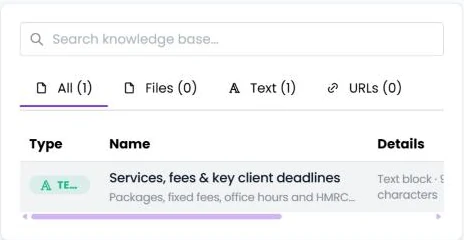
The Knowledge Base holds the facts Neonify should use, such as delivery times, prices and services.
Step 2: plan around the floristry calendar
Work backwards from the dates that drive your orders. For Mother’s Day in the UK, which falls in March, start pre-order posts three to four weeks ahead. Mix in seasonal posts and proof so your feed feels like a shop window rather than a countdown clock. Here is the plan Willow & Wren used for the month before Mother’s Day.
Example: Mother’s Day month for an independent florist
Step 3: write every caption with Quick Post
Open Quick Post, choose Auto, type the topic, for example "Mother’s Day pre-orders are open", and choose your brand voice. Neonify drafts a caption and a matching image. Florists usually swap in their own photo of the real arrangement, which takes seconds, and adjust any detail before publishing or scheduling.
The example below shows one idea adapted for three platforms. Toggle between a generic AI caption and one written in the shop’s brand voice to see why the setup in step 1 matters.
Example posts for a fictional florist, written to show the difference a brand voice makes.
Step 4: publish everywhere at once
Connect Instagram, Facebook, LinkedIn (useful for corporate contracts) and Google Business Profile once. Then publish or schedule each post from one place. During the busiest weeks, your posts go out on time even when you are up to your elbows in stems.
Your monthly content routine
Content ideas for florists, all year round
Seasonal and product
- What has just arrived from the market or your growers
- Flower of the week, with one fact about it
- Seasonal hand-tied of the week and how to order
- Dried and everlasting designs for autumn and winter
- Christmas wreaths and wreath-making workshops
Behind the scenes
- Early-morning market runs
- Conditioning stems and why it matters
- Building a wedding arch or installation
- Meet the team
Helpful and educational
- How to make cut flowers last longer
- What to write on a sympathy card
- Choosing wedding flowers by season and budget
- Why British-grown stems are worth it
Proof and community
- Customer reviews and thank-you posts
- Weddings and events, shared with permission
- Local businesses and venues you supply
- Charity and community events you support
Weddings and corporate clients
Instagram sells hand-ties, but weddings and corporate contracts are where many florists make their steadiest income, and they need a slightly different kind of content. Couples planning a wedding want to see how you work: the consultation, the mood boards, the trial arrangement and the morning of the big day. Share these stories with permission, and talk about budget and seasonality honestly, because couples appreciate a florist who explains what is realistic.
For corporate work, LinkedIn is surprisingly effective. Office managers, hotel managers and restaurant owners use it, and a weekly post about a reception arrangement or a seasonal change-over reminds them you exist. Use the same brand voice, keep it practical and include how a contract works. If the owner has a strong personal style, a Digital Twin keeps those posts sounding like them.
Tips for florists
Name your stems. Specific captions ("apricot ranunculus and British tulips") sell better than vague ones, and they are good for search too. Always include the practical bit: price range, how to order and the delivery cut-off. Use your own photos wherever possible, because customers want to see what they will actually receive. And plan the big dates a month ahead, so the busiest weeks are about flowers, not captions.
With your brand voice and facts in Neonify, a month of captions takes one sitting. That leaves your evenings for what you actually enjoy, or for sleep before the next market run.
Frequently asked questions
What should a florist post on Instagram?
A mix of seasonal stems and designs, behind-the-scenes studio moments, finished wedding and event work (with permission), customer reviews, and timely reminders for key dates such as Valentine’s Day and Mother’s Day.
How far ahead should florists plan for Valentine’s and Mother’s Day?
Start posting about pre-orders three to four weeks before the date, then increase to reminders in the final week. Planning the posts in one sitting a month ahead means you are not writing captions during your busiest days.
Does Neonify create images as well as captions?
Quick Post can draft a caption and a matching image from a topic. Many florists prefer to use their own photos of real arrangements, and you can attach your own media before publishing.
Can I post to Google Business Profile as well as Instagram?
Yes. Connect Google Business Profile alongside Instagram, Facebook and LinkedIn and publish to them from Neonify. Google posts help people searching for a florist near them.