

Most plumbers, heating engineers and other trades win work the same way: word of mouth, a good review on Google and a customer who saw your van or your post at the right moment. Social media and your Google Business Profile are simply the modern version of word of mouth. The trouble is that you are on site all day, and the last thing you want to do at night is think of something clever to say on Facebook.
Here is the secret: you do not need to be clever. You need to show your work, explain it simply and make it easy to get in touch. This guide shows how trades businesses can turn the photos already on their phone into a steady stream of posts that win local work, using Neonify to do the writing in their own voice.
Why posting is hard for trades
Time is the obvious problem. But there is another one: most trade posts look the same. "Another great job completed! Call us today!" with a blurry photo does not tell a homeowner why they should choose you over the next van down the street. What does persuade people is detail. What was wrong, what you did, why you did it that way and how the customer was left. That is the kind of thing you would explain on the doorstep, and it is exactly what makes a post worth reading.
- "Another job done! Call us today!"
- Posted only when someone remembers
- No detail about what was fixed or why
- Google Business Profile left untouched
- Explains the problem, the fix and the result
- A month of posts batched in one sitting
- Written in your own straight-talking voice
- Published to Facebook, Instagram and Google together
Brookside Plumbing & Heating is a fictional three-engineer business in Brighton and Hove. They do boiler installs and servicing, bathroom plumbing and, increasingly, heat pump installations. They want more heat pump enquiries, a fuller servicing diary in autumn and more five-star Google reviews.
65% have never had any social media training, and 69% have never paid anyone to create content for them (Markel Direct research, August 2026). 28% of UK businesses with fewer than 10 employees report using any AI technology (ONS, AI in UK businesses, July 2026).
Step 1: set up your voice and facts once
Paste a few messages you have sent to customers, your website text or even a quote you are proud of into Neonify, and it builds a brand voice from it. For Brookside, that meant friendly, straight-talking and practical: explain the job like you would to the customer, mention the area you cover and finish with how to book.
Then add your facts to the Knowledge Base: the services you offer, your area, your accreditations such as Gas Safe registration, how quotes work, your servicing prices and your opening hours. Neonify uses this as factual context, so every post mentions the right details without you typing them out each time.
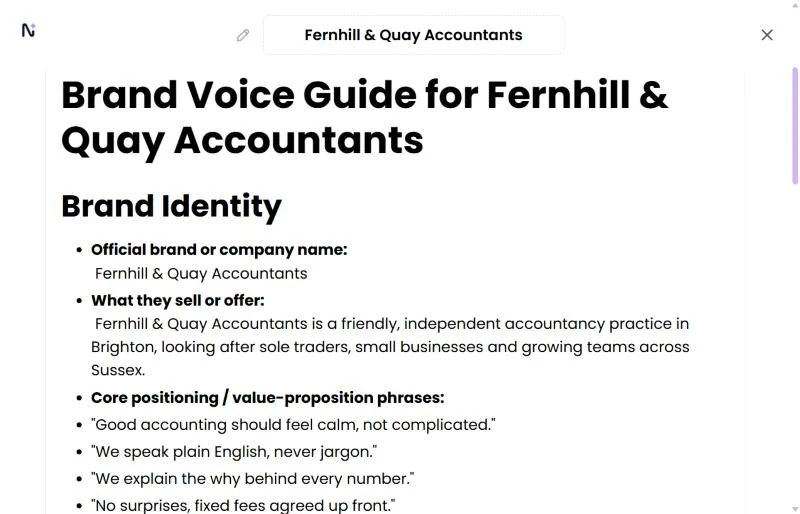
Neonify turns your own words into a brand voice guide that it follows for every post.
Step 2: plan around your seasons
Trades have seasons just like retailers. Boiler breakdowns rise when the heating goes on, outdoor taps freeze in a cold snap, and bathroom refits pick up in spring. Plan your posts to match, and mix job stories with tips and reviews. Here is October for Brookside.
Example: October content plan for a plumbing and heating business
Step 3: turn job photos into posts
At the end of a job, take a before and after photo. When you sit down to create posts, open Quick Post, choose Auto and type what the job was, such as "replaced a 20-year-old boiler with an air source heat pump in a 1930s semi in Hove". Choose your brand voice, and Neonify drafts a caption and an image. Swap in your own photos, check the details and publish or schedule.
The example below shows one job adapted for LinkedIn, Instagram and Google Business Profile. Toggle between a generic AI post and one written in the business’s brand voice and see which one you would call.
Example posts for a fictional plumbing business, written to show the difference a brand voice makes.
Step 4: connect once and let it run
Connect Facebook, Instagram, LinkedIn and, most importantly for local trades, Google Business Profile. Then publish or schedule from Neonify. Your posts go out while you are on site.
The five-minutes-a-post routine
Post ideas for plumbers and trades
- Before-and-after job stories with one line on what was wrong
- Seasonal reminders: boiler servicing, frost protection, summer outdoor taps
- Quick tips: bleeding radiators, finding the stopcock, topping up boiler pressure
- "What we found" posts: the strangest blockage of the month
- Heat pumps, smart controls and efficiency upgrades explained
- What happens during a boiler service
- Your accreditations and what they mean for customers
- Customer reviews and thank-you posts
- Meet the team and the van
- Apprentices and training
- Local community and sponsorships
- Availability this week and how to book
The same approach for other trades
Electricians can show consumer unit upgrades and EV charger installs. Roofers can share drone shots and explain what weather does to a roof. Builders can document an extension week by week. Landscapers have before-and-after gardens that practically write themselves. The formula is the same: show the job, explain the problem and the fix, add a practical tip and make it easy to get a quote.
Tips for trades
Get permission before photographing inside someone’s home, and never show house numbers or anything personal. Be specific about your area, because local detail helps people find you. Ask happy customers for a Google review while you are still on site, and thank them publicly when they leave one. Keep the tone the way you talk: honest, practical and friendly.
The trades that grow fastest are not always the best at marketing. They are the ones people see doing good work, again and again. A few posts a week, written in your voice, is all it takes.
Frequently asked questions
What should a plumber post on social media?
Before-and-after photos of real jobs with a short explanation, seasonal reminders such as boiler servicing before winter, practical tips like how to find your stopcock, reviews from customers and quick introductions to the team.
Is Google Business Profile worth posting on?
Yes. Many customers find local trades through Google search and Maps. Regular posts and fresh photos on your Google Business Profile show the business is active and give people a reason to call.
I am on site all day. How long does this take?
Once your brand voice and facts are set up, creating a post is a matter of typing the topic, checking the draft and attaching a photo. Many trades batch a month of posts in one sitting and let them publish on schedule.
Does this work for electricians, roofers and builders too?
Yes. The same approach works for any trade that does visible, local work: show the job, explain what you did and why, and make it easy to get a quote.